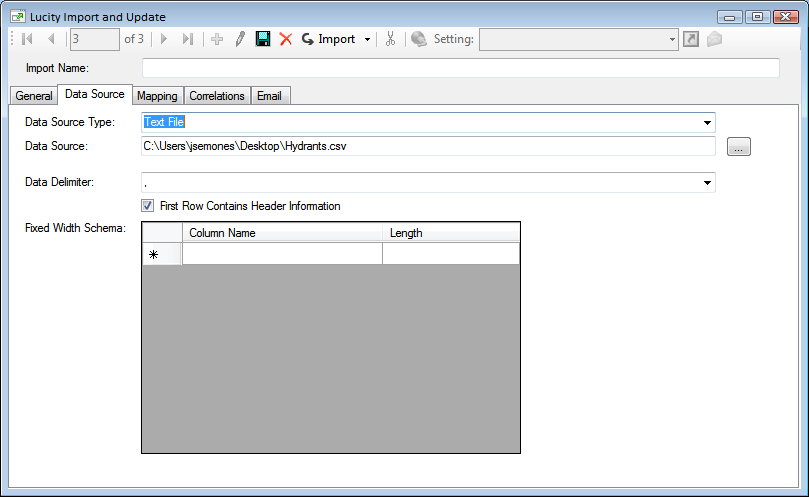
The Data Source tab contains information about the dataset that will be imported.
Data Source Type
This drop down provides a list of data sources the import program can use. These include Access, ODBC, OLE, Oracle, SQL Server, Text File, or XML.
Data Source
Use this field to select the location of the data that the import will use.
This section appears if the Data Source is set to Access, ODBC, OLE, Oracle, or SQL Server.
Data Select SQL
Type in a select statement using SQL to tell the import which records from the data source should be imported.
These options appear if the Data Source is set to Text File, or XML.
Data Delimiter
Indicates what delimiter is used in the data source to indicate breaks in data. Type the delimiter into the field. If the delimiter is 'space' or 'tab' select them using the drop down list.
First Row Contains Header Information
Indicates that the first row of data in the data source is header information and should not be imported.
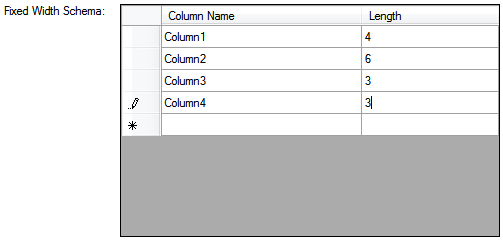
Fixed Width Schema
Some data sources do not use delimiters. Some times they contain a continuous string of data, where each piece of data is a standardized length. This section is used to break up the data into columns.
Use the Data Source Type dropdown and select the type of database connection you will use from the list.
You must choose either Access, ODBC, OLE, Oracle, or SQL Server.
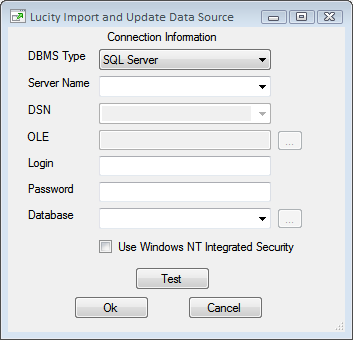
Click the ... button next to the Data Source field. The following pop-up will appear:
The fields that are editable depend on the DBMS Type.
Fill out all fields that are available or change the DBMS Type if a field you need isn't available.
Click Test to see if the program can connect to the database.
Click Ok to accept the settings and close the pop-up.
In the Data Select Sql field enter a SQL statement to select a set of records. Only the records that are part of the Select statement will be considered for import.
Example:SELECT * FROM dbo.Hydrants WHERE Imported = 0
 How to configure a Database Source