Inspection Checklist Setup Fields
ID fields
Checklist Setup Rec #
|
The system-defined ID for the template checklist.
|
Checklist Name **
|
The name of the template checklist. This is what will appear when loading this list template into an inspection checklist.
|
Type
|
The stormwater quality module this checklist is for. The template checklist will only be able to be loaded into the inspection module selected here.
- Ex. If you select SQ Construction Site you will only be able to load the template checklist into the Construction Site Inspection module's checklist.
* Required
* Must be Unique
|
Inspection Checklist Grid
The Inspection Checklist Setup Details Grid stores the list of checklist items.
- Other Inspection Checklist Setup templates can be loaded into this grid using the toolkit.
Grid Tools
 How to add an inspection checklist item
- Select the Inspection Checklist grid and click the
 button.
 - The form will open.
- Fill out the fields as needed.
- Click the
 button to save the record.
How to load a checklist
- Click the
 button and select Load Checklist items from Checklist.
 - The following pop-up will appear:
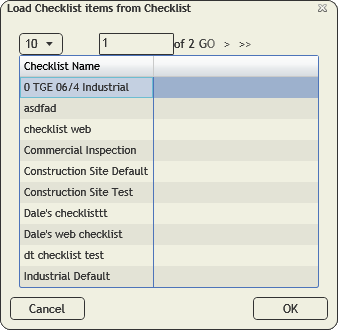
- Select a checklist.
- Click OK.
How to reorder items in the grid
- Click the button and select ReOrder Items.
- The following pop-up will appear:
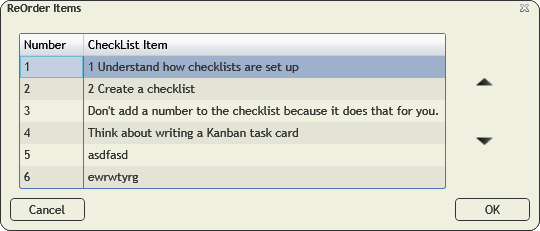
- Select an item in the list and use the arrow buttons to move the item up and down in the list.
- Repeat for any other items that need to be moved.
- Click OK.
- The checklist will reflect the set order.
