Toolkit

The Management Plan Inspection > Inspection Checklist grid contains the following Toolkits.
Load Checklist items from Checklist
Loads a checklist from the Inspection Checklist Setup module.
 How to load a checklist
- Click the
 button and select Load Checklist items from Checklist.
 - The following pop-up will appear:
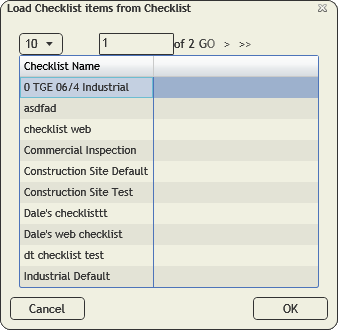
Note: This list will only include checklists that are designed for the module you are currently in.
- Select a checklist.
- Click OK.
Populate pass code for Current Filter
Updates all checklists items to indicate if they passed or failed.
- Updates the Pass field on the checklist.
How to update the pass code for the filterset
- Click the button and select Populate pass code for current filterset.
- The following prompt will appear with a warning about how many records will be affected:

- Click Yes. The following pop-up will appear:
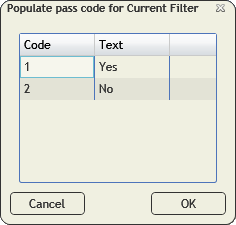
- Select the code you would like to apply to the checklist items in the grid.
- Click OK.
- The Pass field will be updated on all the checklist items.
Populate pass code for Selected Records
Updates all currently selected checklists items to indicate if they passed or failed.
- Updates the Pass field on the checklist.
How to populate the pass code for selected records
- Select one or more checklist items in the grid.
- Click the button and select Populate pass code for selected records.
- The following pop-up will appear:
- Select the code you would like to apply to the selected checklist items.
- Click OK.
- The Pass field will be updated on all the selected checklist items.