The Windows Mobile Lucity PDA Barcode app is no longer supported. It has been replaced with a new Lucity Warehouse application that offers only Android and iOS support.
Clients must use new versions (v. 2.0+) of the Lucity Mobile client applications . The older versions (1.x) are targeted for the Lucity 2015r2 and earlier releases.
Other System Changes
Relative Document Pathing
Lucity no longer supports relative document pathing; therefore, the option has been removed from from Client Maintenance. Any relative document paths will be automatically converted to an absolute document path using the old user entered relative document path in Client Maintenance.
PACP/MACP Imports
PACP and MACP TV imports must be performed with the Lucity Import and Update tool. The older TV Import program no longer works for these imports.
Field Definitions
Field definitions that have been customized must now be locked. Lucity will attempt to determine which definitions were customized in the 2016 upgrade; however, in future releases, Lucity's default definitions will overwrite any local, unlocked definitions.
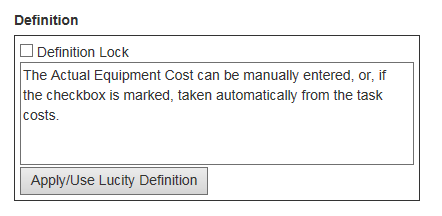
The FieldDef.mdb database is no longer used to store field definitions and Lucity no longer offers a method to import them from MS Access in bulk. All default field definitions are now stored directly in the Lucity databases. Clients can overwrite their custom definitions with the Lucity default from the field properties dialog:
Module Enhancements
The following is a summary of the changesmade in Lucity 2016. All enhancements are for both Web and Desktop unless otherwise noted with the symbols on the right.
Desktop
Web
Environmental
Survey Site Inspections
Added more user-defined fields.
Equipment
Equipment Inventory
Equipment Parts grid - Users can now select a record and use the Open in Another View button to jump to the related Work Material record.
General
Custom Inventory
Added more user-defined fields.
Custom Inspection
Added more user-defined fields.
Parcels
Added more user-defined fields.
Added Activity, Function, Structure, Site, and Ownership fields.
Parts Warehousing
Part Transaction Log
Lucity now tracks the quantity and unit cost for each Part following every transaction in which the part is used.
Purchase Orders
Added a Warehouse field to specify the Warehouse for which the Purchase Order is being made. When the Warehouse is specified, the list of Parts displayed in the Add Multiple Parts tool must belong to the Vendor and be found in the Warehouse.
Added Account # and Project No - Acct fields.
Plants
Plant Processes
Added a required Process ID field.
Added the ability to create Work Orders, Requests, and PMs from a Plant Process record.
Added standard Work Order fields.
Added an Operating Status field.
Added Subprocesses to enable users to link processes with a parent-child relationship.
Added more user-defined fields.
Sewer
MACP Inspections
Now compliant with MACP version 7.01.
PACP Inspections
Now compliant with PACP version 7.01.
LACP Inspections
Now compliant with LACP version 7.01.
Building Inspections
Added a General Comment field to the Sump Pump dialog.
Service Permit
Added more user-defined fields.
Storm
Storm PACP Inspections
Now compliant with PACP version 7.01.
Transportation
Anti-Icing Pump Houses
Segment ID - Added to enable users to link the record to a Street Segment record.
Intersection ID - Added to enable users to link the record to a Street Intersection record.
Subsegment ID - Added to enable users to link the record to a Street Subsegment record.
Supersegment ID - Added to enable users to link the record to a Street Supersegment record.
Alt Controller ID - Added to enable users to link the record to a Controller record.
Alt Cabinet ID - Added to enable users to link the record to a Cabinet recprd.
Alt Pole ID - Added to enable users to link the record to a Street Pole record.
Alt Mast ID - Added to enable users to link the record to a Street Mast Arm record.
Equipment ID - Added to enable users to link the record to an Equipment record.
Automatic Gates
Segment ID - Added to enable users to link the record to a Street Segment record.
Intersection ID - Added to enable users to link the record to a Street Intersection record.
Subsegment ID - Added to enable users to link the record to a Street Subsegment record.
Supersegment ID - Added to enable users to link the record to a Street Supersegment record.
Alt Controller ID - Added to enable users to link the record to a Controller record.
Alt Cabinet ID - Added to enable users to link the record to a Cabinet recprd.
Alt Pole ID - Added to enable users to link the record to a Street Pole record.
Alt Mast ID - Added to enable users to link the record to a Street Mast Arm record.
Equipment ID - Added to enable users to link the record to an Equipment record.
Camera Locations
Segment ID - Added to enable users to link the record to a Street Segment record.
Intersection ID - Added to enable users to link the record to a Street Intersection record.
Subsegment ID - Added to enable users to link the record to a Street Subsegment record.
Supersegment ID - Added to enable users to link the record to a Street Supersegment record.
Alt Controller ID - Added to enable users to link the record to a Controller record.
Alt Cabinet ID - Added to enable users to link the record to a Cabinet recprd.
Alt Pole ID - Added to enable users to link the record to a Street Pole record.
Alt Mast ID - Added to enable users to link the record to a Street Mast Arm record.
Equipment ID - Added to enable users to link the record to an Equipment record.
DMS
Segment ID - Added to enable users to link the record to a Street Segment record.
Intersection ID - Added to enable users to link the record to a Street Intersection record.
Subsegment ID - Added to enable users to link the record to a Street Subsegment record.
Supersegment ID - Added to enable users to link the record to a Street Supersegment record.
Alt Controller ID - Added to enable users to link the record to a Controller record.
Alt Cabinet ID - Added to enable users to link the record to a Cabinet recprd.
Alt Pole ID - Added to enable users to link the record to a Street Pole record.
Alt Mast ID - Added to enable users to link the record to a Street Mast Arm record.
Equipment ID - Added to enable users to link the record to an Equipment record.
PDMS
Segment ID - Added to enable users to link the record to a Street Segment record.
Intersection ID - Added to enable users to link the record to a Street Intersection record.
Subsegment ID - Added to enable users to link the record to a Street Subsegment record.
Supersegment ID - Added to enable users to link the record to a Street Supersegment record.
Alt Controller ID - Added to enable users to link the record to a Controller record.
Alt Cabinet ID - Added to enable users to link the record to a Cabinet recprd.
Alt Pole ID - Added to enable users to link the record to a Street Pole record.
Alt Mast ID - Added to enable users to link the record to a Street Mast Arm record.
Equipment ID - Added to enable users to link the record to an Equipment record.
Weather Stations
Segment ID - Added to enable users to link the record to a Street Segment record.
Intersection ID - Added to enable users to link the record to a Street Intersection record.
Subsegment ID - Added to enable users to link the record to a Street Subsegment record.
Supersegment ID - Added to enable users to link the record to a Street Supersegment record.
Alt Controller ID - Added to enable users to link the record to a Controller record.
Alt Cabinet ID - Added to enable users to link the record to a Cabinet recprd.
Alt Pole ID - Added to enable users to link the record to a Street Pole record.
Alt Mast ID - Added to enable users to link the record to a Street Mast Arm record.
Equipment ID - Added to enable users to link the record to an Equipment record.
Sensors
Segment ID - Added to enable users to link the record to a Street Segment record.
Intersection ID - Added to enable users to link the record to a Street Intersection record.
Subsegment ID - Added to enable users to link the record to a Street Subsegment record.
Supersegment ID - Added to enable users to link the record to a Street Supersegment record.
Alt Controller ID - Added to enable users to link the record to a Controller record.
Alt Cabinet ID - Added to enable users to link the record to a Cabinet recprd.
Alt Pole ID - Added to enable users to link the record to a Street Pole record.
Alt Mast ID - Added to enable users to link the record to a Street Mast Arm record.
Equipment ID - Added to enable users to link the record to an Equipment record.
Kiosks
Segment ID - Added to enable users to link the record to a Street Segment record.
Intersection ID - Added to enable users to link the record to a Street Intersection record.
Subsegment ID - Added to enable users to link the record to a Street Subsegment record.
Supersegment ID - Added to enable users to link the record to a Street Supersegment record.
Alt Controller ID - Added to enable users to link the record to a Controller record.
Alt Cabinet ID - Added to enable users to link the record to a Cabinet recprd.
Alt Pole ID - Added to enable users to link the record to a Street Pole record.
Alt Mast ID - Added to enable users to link the record to a Street Mast Arm record.
Equipment ID - Added to enable users to link the record to an Equipment record.
Street Signal
Added more custom fields.
Trees/Parks
Park Inventory
Added grids to display related Distribution and Recycled Water Meters.
Park Meter Water-Reading History
Added new 'Gallon' option to measurement fields to accommodate agencies that prefer to display Park Meter Water Reading measurements in gallons, rather than cubic feet.
Added a Water Rate field to enable users to change the Water Rate charged during the course of the year. The Calculate Differences for Filter Set toolkit now uses this field to recalculate costs.
Park Meter Water Consumption Library
Modified all toolkits so that they copy the Water Rate to the new Water Rate field on the Reading History record.
Water - Distribution
AMR Device
When an AMR Device is installed at a Meter Location, Lucity updates the device's XY Coordinates with the Meter Location record's XY coordinates.
When an AMR Device is removed from a Meter Location, the devices's XY Coordinates are reset to zero (0).
Direct Hydrant Flushing
Created a new module that enables agencies to enter simple Flushing records that are tracked against a single Hydrant.
Hydrant Inventory
Added a grid to display related Direct Hydrant Flushing records.
Meter Device
When a Meter Device is installed at a Meter Location, Lucity updates the device's XY Coordinates with the Meter Location's XY coordinates.
When a Meter Device is removed from a Meter Location, the XY Coordinates are reset to zero (0).
Meter Devices can now be linked to Parks.
Water Options
Added a new option(In Flushing Route, Copy Hydrants to Work Orders with Tool) that directs the Create Flushing History and WO toolkit in the Hydrant Flushing module to copy the route's Hydrants to the new Work Order.
Added a new option(In Flushing Route, Copy Valves to Work Orders with Tool) that directsthe Create Flushing History and WO toolkit in the Hydrant Flushing module to copy the route's Valves to the new Work Order.
Added a new option(In Flushing Route, Copy Pipes to Work Orders with Tool) that directsthe Create Flushing History and WO toolkit in the Hydrant Flushing module to copy the route's Pipes to the new Work Order.
When these options are enabled, they have the same affect when the user clicks the Create Work Order button on the Flushing Route record.
Supply Source
Supply Sources can now be linked to Water Pump records.
Water - Raw
AMR Device
When an AMR Device is installed at a Meter Location, Lucity updates the device's XY Coordinates with the Meter Location record's coordinates.
When an AMR Device is removed from a Meter Location, the devices's XY Coordinates are reset to zero (0).
Meter Device
When a Meter Device is installed at a Meter Location, Lucity updates the device's XY Coordinates with the Meter Location's coordinates.
When a Meter Device is removed from a Meter Location, the XY Coordinates are reset to zero (0).
Supply Source
Supply Sources can now be linked to Water Pump records.
Water - Recycled
AMR Device
When an AMR Device is installed at a Meter Location, Lucity updates the device's XY Coordinates with the Meter Location record's coordinates.
When an AMR Device is removed from a Meter Location, the devices's XY Coordinates are reset to zero (0).
Meter Device
When a Meter Device is installed at a Meter Location, Lucity updates the device's XY Coordinates with the Meter Location's coordinates.
When a Meter Device is removed from a Meter Location, the XY Coordinates are reset to zero (0).
Meter Devices can now be linked to Parks.
Supply Source
Supply Sources can now be linked to Water Pump records.
Work
Employee Cert and Classes
Certification > Employee Records
Added Add Pay and Job Required checkboxes.
Addeda % Add Pay checkbox.
Added an Employee Certification Notification option to alert an employee that a certification is about to expire.
Classes
Added new fields that allow users to prepare and send an email reminder to employees enrolled in a class.
Added Add Multiple Employees and View Employee Record tools to the Employees Attending grid.
PM/Template
Grouped PM - Added the System ID 1 and Description fields so that the Grouped PM Asset Grid was more useful.
Added a WO Template checkbox to indicate that the record can be used as a template for a new Work Order. Previously, all records not marked as a Scheduled PM were treated as templates.
Added a PM Template checkbox to indicate that the record can be used as a template for a new PM.
Added an Inactive checkbox to mark a record as inactive. These records do not appear in Template lists and are ignored by the PM service.
Added an Affected PM checkbox to indicate that the PM bases its schedule on another PM's schedule.
Work Flow Setup modules
Cause Setup
Added Division code/type fields.
Contractor Setup
Added Division code/type fields.
Crew Setup
Added Division code/type fields.
Added an Hours per Day field. Lucity gives this field precedence over the Lead Worker's or Supervisor's Hours per Day fields (in Employee Setup) or the Hours per Day option (in the Work program).
Employee Setup
Added Division code/type fields.
Added Hours per Day field to establish the number of hours per a day that lead workers and supervisors work.
Fluid Setup
Added Division code/type fields.
Material Setup
Added Division code/type fields.
Task Setup
Added a Project Task checkbox to indicate whether the Task can be used as a Project Task in Lucity's Project Management suite.
Added a Don't Reset WO Route field. When a Task is selected as the Main Task on a Work Order, the system automatically applies that Task's routing information. If the Main Task is changed, the routing information is cleared. If the Don't Reset WO Route option is checked here, and the Main Task is changed on the Work Order, the Work Order retains the original routing information.
Work Orders
Added a Project ID field to enable users to manually link a Work Order to a Project. To do this the Work Order's Main Task must match one of the Project Tasks.
Added more user defined fields.
Work Permits
Added more user-defined fields.
Work Utility Locates
Added more user-defined fields.
Added more user-defined fields to Members Contacted records.
Work - Project Management
The Project Management modules were added to Lucity Web's Work program in 2016. However, there are a few modules missing pending enhancements requested during ACT 2015.
Master Projects
Added an Est Completion % Date field that shows what percentage of the project's estimated duration has already transpired.
Added a Start Date field.
Added the fields above to the Project Activities tab and moved the Projected Approved (date) and Est Completion Date fields to thattab, as well.
Master Project Activities
Added an Assigned To field that lets users assign a Master Project to an Employee record. Only Employees marked as a Project PM in the Employee module are included in the drop-down list.
Projects
Added an Est Completion % Date field that shows what percentage of the project's estimated duration has already transpired.
Added Project Start Date, Project Actual Completion Date and Project Close Date fields.
Added the fields above to the Project Activities tab and moved the Award Date, Notice to Proceed Date, Design Completion Date, Construction Completion Date, and User Date fields to that tab, as well.
Added a Project Activities grid to link Projects to the new Project Activities module.
Added a Project Assets grid to let users link Assets to a Project.
Project Activities
This new module, which is similar to the Master Project Activities module, enables agencies to track Activities related to a Project. It is accessed through the Project Management menu.
Incorporated the ability to import records from the Master Project Activities Library into the Project Activities module.
Project Contract Estimates
Changed the way that the Contract Estimate process works. In previous versions, users first created a detailed Contract. Then, they created an Estimate for that Contract and had the details approved. In version 2016, users first create a detailed Contract Estimate. When the Estimate is approved, Lucity automatically creates the Contract based on the Estimate details.
Removed the Contract ID field.
Added a Contracts grid, which enables users to link multiple Contracts to the Project Estimate record.
Added a Type (code/type) field to enable users to filter based on the type of estimate.
Added more user-defined fields.
Project Contracts
Introduced the ability to add Contract Details (line Items). This information is carried over to any POs that are created from or linked to a Contract.
Added a Percentage field to the record that links the Contract to the Project in the Projects grid.
Administration Tool
The majority of changes in this section only affect Lucity Web.
Activation Manager
Modified the interface to reflect changes in Lucity's mobile applications, which no longer require activation codes. The Activation Manager now simply displays a list of devices that have an active license for Lucity Mobile.
System Settings
Security
Added a setting, Enable diag.html Server Information for debugging, that disables part of the Lucity Web diagnostics page to protect server information if an agency runs Lucity Web over the open Internet.
Added settings—How to Handle Frames for (Internal or Citizen) Web Pages—to protect against the small threat of click-jacking.
Added a Can users change Password from Mobile setting to enable administrators to control whether users can change their Lucity passwords from mobile devices.
Security - Passwords
Added a feature, Send an email to the user when their password changes, that automatically alerts a user when his or her password changes.
Added a setting, Allow easily guessed passwords, that, whendisabled, prevents users from using common passwords like 'password,' '123abc,' 'lucity,' etc.
Documents
Added a setting, Documents with file size greater than given size, are opened using file path. Default size is 500mb, that limits the size of documents displayed within Lucity. If the document is above the set limit, the system provides a link to the document, rather than displaying it.
Added a Enable External Document Integration setting to let administrators integrate Lucity Web with a third-party document-storage system.
Introduced a new set of system settings for managing the Identity Server.
Mobile
Added a setting, Update the offline (Android or iOS) cache nightly, that directs themobile server to cache offline data for the Lucity Android and iOS applications every night.
REST API
Added a setting, Automatically push invalid request addresses to the General Location field, that allows third-party developers to instruct the Citizen Portal REST API to automatically move an invalid address to the General Location field (if empty).
Reports
Removed Reports from the Administration Tool because its functionality is now available in Lucity Web.
Forms
Modified the Editing Forms feature so that users remain logged in and can see any changes made to the Form almost immediately after saving. The feature no longer kicks users out of Lucity Web.
Added reports that display all of the Views/Grids/Forms that a user has created. These reports can be run from any Lucity Desktop module.
Street Renaming Tool
This new tool lets administrators update a Street Name System-wide to correct a misspelling or to change it to a completely new name.
The tool is installed with Lucity Desktop and is found in the \bin folder.
Desktop
Create PM/Template Tool
Added the ability to create a new Template based on an existing Template.
GIS
We now support ArcGIS Desktop 10.4 but we do not support ArcGIS for Server 10.4.
ArcMap Tools
Modified the TV Observation Tool to enable users to filter results by Severity rating.
Configured the Lucity Water Tools (split, merge, renumber) to work with raw and recycled water features.
Enhanced the Show in Map tool to display Water Meter Devices, AMRs, Construction record assets, Water Flushing Route assets, and Work Permit assets.
Configured the Editor Extension to:
Warn users if the Common ID they entered is a duplicate.
Permit default values mapped in the Geodatabase Configuration tool to be synced into Lucity when users add or edit a record.
Added a new user setting to disable the Existing Common ID prompt.
ArcCatalog Tools
Geodatabase Configuration
Added a Integration Summary Report that displays information about the Geodatabase Configuration. This report can be run against the entire configuration or a single feature class.
Introduced tools for adding or removing Attribute Indexes. Adding indexes for the Common ID (Facility ID) and Auto ID (Lucity ID) fields makes Lucity GIS tools run faster.
Domain Tools
Added an Update Work Maintenance Zone Domain tool to create and assign domains for the Work Maintenance Zone fields. This tool can be run against the entire configuration.
Added an Update Work Alternate Zone Domain tool to create and assign domains for the Work Alternate Zone fields. This tool can be run against the entire configuration.
Added a Show Current Values and Record Counts option to the Domain Configuration Tool that is useful when managing domains. The option displays the number of records in GIS and Lucity using the the various codes.
Users may now set a Default Value for a field by entering =value (ex: =6) in the field's configuration. The indicated field will be updated to the default value every time the feature is synced.
GIS Scheduled Tasks
Modified the module to support the reverse geocode spatial relationships.
Updated the Tasks' import logic to account for the new GIS Default values required for the GIS-to-Lucity synchronization process.
Lucity GIS Viewer
Added measurement tools.
New Lucity Modules Now Supported by the Lucity GIS Integration
Water Meter Device
Water AMR
Recycled Meter Device
Recycled AMR
Raw Water Meter Device
Raw Water AMR
Plant Process
Import and Update
Launching the Import and Update requires users to have a new Admin > Import and Update > Run permission.
Install
Lucity Desktop
The Desktop installation now includes the Lucity Security and Client Maintenance programs. Previously, these programs were installed only with a complete install. This change does not pose a security risk, because each of these tools still require administrator credentials.
The GIS Viewer continues to be available only through the Custom install.
Lucity Server
Client Maintenance
Modified the interface to include only one database tab per client to reflect the unified database.
Removed the Documents tab because Lucity no longer supports relative document pathing.
Lucity Web
Configured the system to automatically launch the Lucity WebREST API installation.
Lucity Web REST API
Introduced a new version of the REST API that Lucity Web uses to perform critical functions.
Lucity Identity Server
This is a new application that other Lucity applications require to identify, authenticate, and track Lucity user logins.
REST API
Status Codes
When a user is not authorized to perform an action due to permissions, the REST API now returns a 403 Forbidden code. Previously, the system returned a 401 Unauthorized code. 401 is now used only to indicate a failure to log into Lucity or an expired login session.
Security
User Permissions
Lucity no longer manages security using individual user permissions. Individual permissions were removed to simplify the Security program and improve overall performance of the product. Instead, users should obtain their permissions from the groups in which they are members.
Services
Lucity Scheduler Service
Now runs all Lucity background processes including nightly tasks and PM generation.
No longer tracks nightly PM information in the Lucity.dbo.SYSTEMLOG table.
All of the scheduled tasks are being updated to the use Lucity’s BackgroundTaskUser.
Web
In version 2016, a single user can open multiple instances of Lucity Web, allowing him or her to display it on multiple monitors. Nevertheless, it is a violation of the Lucity Software License Agreement for users to share user logons.
Dashboard
Modified the Manage Shared Tabs tool to display each user's Default Rules Group.
Eliminated the Dashboard reports distinction, because all reports can now be displayed on the Dashboard.
Added a Map Plugin that can display a Lucity Webmap on the Dashboard.
Frames can be set to Show in Plugin Map. When frames are toggled in this manner Data Drills, Quick Lookups, and Asset Hierarchy Trees information will be displayed in the Map Plugin found on the same Dashboard tab, instead of opening in a module view.
User Controls
Enhanced theReset Password function to display related password requirements.
Views/Grids/Forms
Documents
Rewrote the tool using HTML.
Added a Carry Over to Work Order option that links the document to any Work Order created from the related asset.
Added a Bypass Document Server to View Document option that, when enabled, prevents the document server from opening the document. Instead, the system displays a path to the document that the user can copy. This option is useful for large documents that would slow down the document server.
Separated Documents and Links onto different tabs within the tool.
Instead of using Silverlight to open documents from a view, HTML is now used. This results in some behavior differences due to how browsers treat files opened. This will be particularly true of documents which are configured to only be downloaded directly (not opened through the document server). Behavior will vary depending on the browser used, the plugins used in that browser (such as quicktime), where the file is stored, and the default application configured for opening a file type. The Lucity GIS web application still uses Silverlight for document access.
External Documents Tool
Added an External Documents Tool to enable agencies to integrate Lucity with a third-party document-management system. Using this tool, an administrator can set a URL to pass values from a record in Lucity to an external document system. The external document system can then pass back links to matching documents.
Filters
Rewrote the tool using HTML.
Added the ability to use reserved words in the Filter Builder.
Allows editing of most existing filters using the Filter Builder.
Reports
Rewrote the tool using HTML.
Added the ability to manage Report Groups in Lucity Web.
Added the ability to download a copy of a report's .rpt file.
Simplified the process of adding a Quick Report.
Changed the way Lucity refers to report views:
Basic View - Generates the first x number of pages of the report as basic PDF.
Advanced View - Generates the first page of the report and displays it on the Dashboard. Users can page through the report one page at a time, regardless of the number of pages. Also enables users to view parameters and export the report.
Webmap
Enhanced the Trace tool to enable users to select Sewer FOG and IPT Facilities during a Sewer Pipe trace and to select Storm BMP Assets during a Storm Conduit trace.
Show in Webmap
Integrated the tool with with Water Flushing records.
Integrated the tool with Water Meter Devices and AMR Devices.
New Modules Available for Editing in Lucity Web and Mobile with 20.1
 Desktop
 Web
Web