 Add a Plant
- In the Plant Inventory module, click the
 button. A new record appears.
 - Supply the Plant ID (required). The ID must be unique.
- Set the Operating Status.
- Enter or select a Property ID to link the Plant to an Address record.
- Classify the purpose of the plant in the Use field.
- Complete other fields as desired.
- Click the
 button to save the record. The new record appears in the grid.
- Open the Distribution Water Pipe module and attach related Pipes to the Plant
- Open the Water Pipe module.
- Click the
 button next to the record you want to link to the Plant.
 - If the pipe enters the plant, enter or select the desired Plant ID in the Entering Plant field.
- If the pipe exits the plant, enter or select the desired Plant ID in the Leaving Plant field.
- Click the button to save the record.
- Open the Raw Water Pipe module and attach related Pipes to the Plant
- Open the Raw Water Pipe module.
- Click the button next to the record you want to link to the Plant.
- If the pipe enters the plant, enter or select the desired Plant ID in the Entering Plant field.
- If the pipe exists the plant, enter or select the desired Plant ID in the Leaving Plant field.
- Click the button to save the record.
- Open the Recycled Water Pipe module and attach related Pipes to the Plant
- Open the Recycled Water Pipe module.
- Click the button next to the record you want to link to the Plant.
- If the pipe enters the plant, enter or select the desired Plant ID in the Entering Plant field.
- If the pipe exists the plant, enter or select the desired Plant ID in the Leaving Plant field.
- Click the button to save the record.
- Open the Sewer Pipe module and attach related Pipes to the Plant
- Open the Sewer Pipe module.
- Click the button next to the record you want to link to the Plant.
- If the pipe enters the plant, enter or select the desired Plant ID in the Entering Plant field.
- If the pipe exits the plant, enter or select the desired Plant ID in the Leaving Plant field.
- Click the button to save the record.
- Open the Storm Conduit module and attach related Conduits to the Plant
- Open the Storm Conduit module.
- Click the button next to the record you want to link to the Plant.
- If the pipe enters the plant, enter or select the desired Plant ID in the Entering Plant field.
- If the pipe exits the plant, enter or select the desired Plant ID in the Leaving Plant field.
- Click the button to save the record.
Add related Plant ProcessesMethod 1 - Adding the Process from the Plant Inventory Record
- Open the Plant Inventory module.
- Click the
 button next to the desired Plant record.
 - Select the Plant's Plant Processes grid and click the button. A new Process record opens with the ID for the selected plant in the Plant ID/Plant Name field.
- Continue to Filling Out the Record (below).
Method 2 - Adding the Process from the Processes Module
- In the Plant Processes module, click the button. A new record appears.
- Enter or select the Plant ID for the Plant that the Process is a part of (required).
- Continue to Filling Out the Record (below).
Filling Out the Record
- Enter a Process ID (required). This serves as a unique ID for the Process record.
- Enter a unique code for record in the Process field (required). This code provides a secondary method of identification.
- Describe the process in the Process Text field.
- Complete other fields as desired.
- Click the button to save the record.
Add Equipment records that are related to your Plant Processes- Open the Equipment Inventory module.
- Click the button. A new record will open.
- Fill out the Equipment ID. (required) This must be unique.
- Enter a more complete description in the Equipment ID Text field.
- Set the equipment's Operating Status. Anything below 950 is considered to be in service.
- Categorize the equipment using the Equipment Type.
- Complete other fields as desired.
- Click the button to save the record. The new record appears in the grid.
- Add Equipment Slots
- Open the Plant Processes module.
- Click to expand the desired Process record.
- Select the Slots grid and click the button. A new slot record appears:
- Enter a Slot Number ID to identify the slot (required). This ID must be unique to the selected Plant Process.
- Use the Equipment Type field to indicate the type of equipment that occupies this slot (required).
- Once selected, only Equipment records of that Equipment Type can be installed in this slot.
- Click the button to save the record.
- Install Equipment in the Equipment Slots
- Open the Plant Process module.
- Click the button next to the desired Plant Process record.
- In the expanded record, select the Slots grid.
- Click the Slot in which you would like to install a piece of Equipment.
- Click the
 button and select Install Equipment. A prompt similar to the following appears: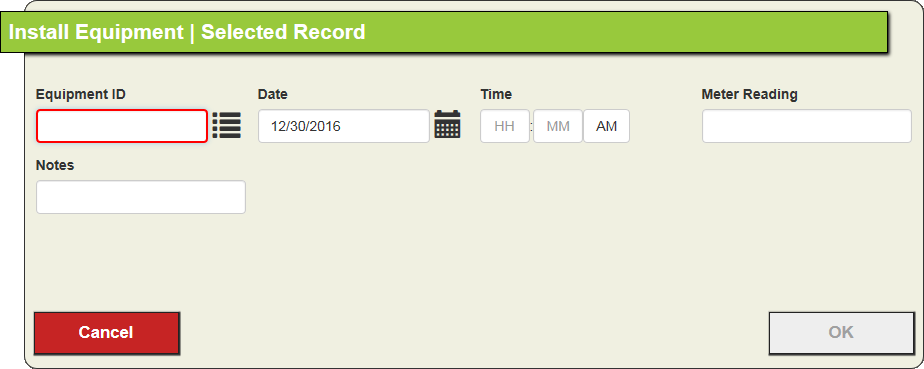
- Enter the Date of the installation (required).
- Enter or select the Equipment ID for a record from the Equipment module.
- Only Equipment records of the same Equipment Type as that of the Slot can be installed in that position.
- Complete other fields as desired.
- Save and close the record. The Equipment is now installed in the Slot, and a record of the action appears in the Slot's Equipment History grid.
- Add any dependent Processes
- Open the Plant Processes module.
- Click to expand the desired process record.
- Select the Dependents grid and click the button. A new Dependent record appears.
- Enter or select the Plant Process ID for the dependent process (required).
- Click the button to save the record. The subordinate Process now appears in the parent Process's Dependents grid. The original process appears in the dependent Process's Parent grid.
- Repeat Step 3.a and 3.b for any dependent Processes