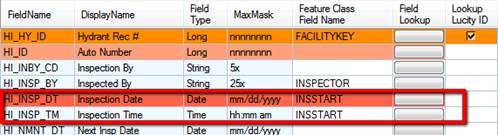
Users can link Lucity's Date and Time fields to GIS Composite Date/Time fields. Note, however, that Lucity stores the Date in one field, and the Time in another; the GIS Composite fields, on the other hand, store this information in a single field. To link a composite Date/Time field to Lucity, link that field to Lucity's Date field AND to its Time field.
GIS Subtypes can be linked to the matching Subtype field in the Lucity module. However, for them to work properly you must run the Domain Configuraiton tool and use the Repopulate Lucity to match GIS button. This will copy the subtypes from the Geodatabase into the related Lucity Picklist.