
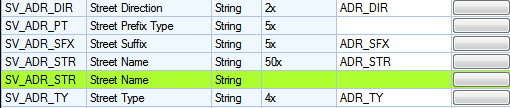
Address fields are made up of multiple components and can be linked using 2 different configurations
Components
Lucity breaks out street address information into the following fields.
Multiple field configuration
In this configuration the feature class has all of the different building number and street name fields broken out. This is configured by linking each field in the feature class to each field in Lucity
Single Field configuration
In this configuration the feature class has the building number fields combined and the street name fields combined. This is configured by linking the field in the feature class to the special composite field in the geodatabase configuration

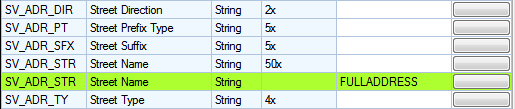
Combined Configurations
These configurations can be used together but both configurations for the same component cannot be used together.
Only the Lucity code fields are displayed in the Feature Class Fields grid. The Domain Configuration tool can be used to further define the mapping between a GIS field to a Lucity picklist field. Lucity supports mapping a text GIS domain to Lucity numeric picklist and vice versa.
X/Y - The X Y fields in Lucity are available for people to map to. However, if they remain unmapped, they are automatically updated using the feature's XY coordinate.