Document Viewer
The Document Viewer gives administrators the ability to see and manage files in their system that are linked to records in Lucity. Note that this only shows files that are stored within the:
- Internal Document Hive - Stores files attached to files within the Lucity System and uploaded via EAM Web and Mobile. This is managed by the Lucity Document Server but clients can also create custom folders within this location to store other files.
- Citizen Document Hive - Stores files attached to requests and uploaded via the Citizen Portal or Citizen REST API. This is managed by the Lucity Document Server.
- Citizen file stores - Stores files for various request related applications.
These locations are set in the System Settings > Documents section.
 Requires the Admin > IT Admin > Run permission.
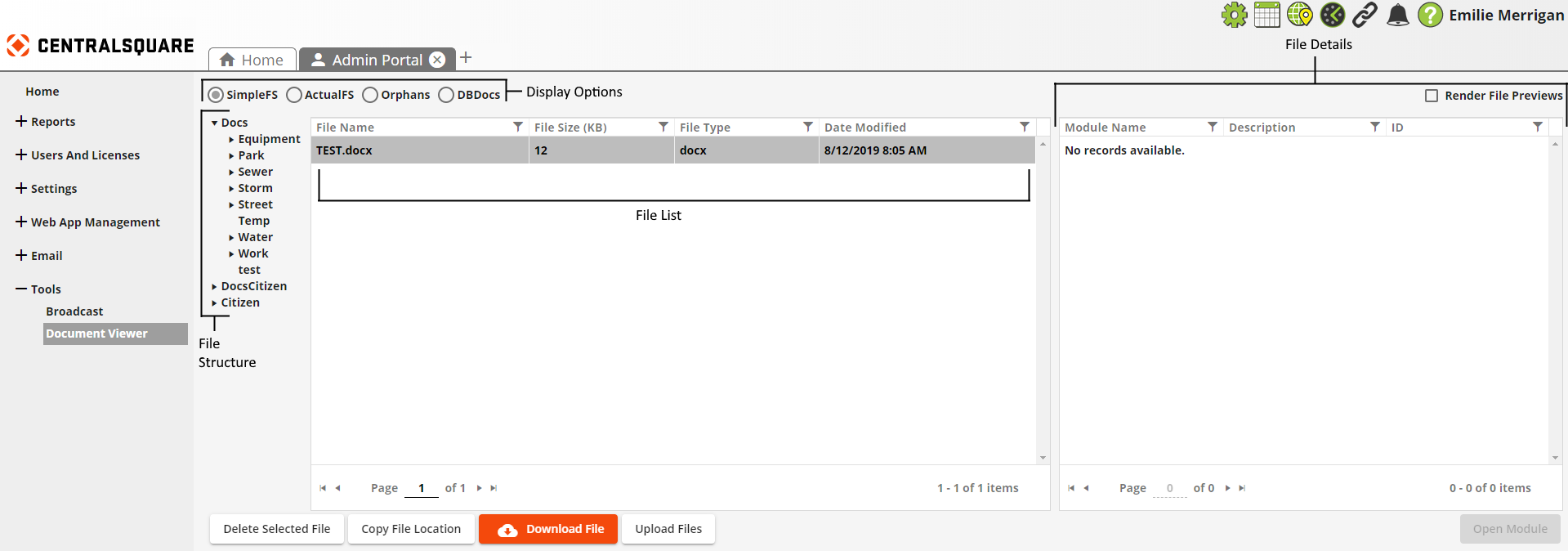
Components
|
Display Options |
Options that appear across the top of the Document Viewer. These control how the File Structure and FIle List display documents. |
|
File Structure |
Displays the directories stored in the Lucity Document Hive. Appearance and available options are dictated by selected Display Options at top of page. |
|
File List |
Displays the files stored in the directory selected in the File Structure. Appearance and available documents are dictated by selected Display Options at top of page. |
|
File Details |
Displays information about the file selected in the File List. |